
Appearance
Communication Model
Overview
The following diagram summarizes how the front-end and the emulator core exchange information.
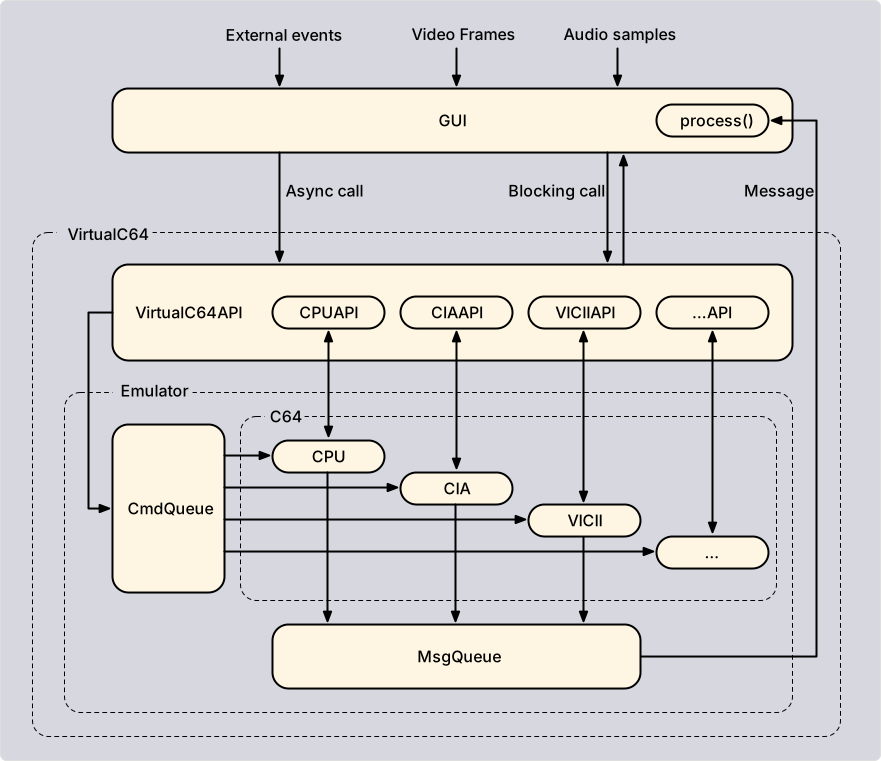
The thread structure behind this picture is described in the Architecture chapter. Three mechanisms are involved:
Command queue
Requests that change the state of the emulator travel through the command queue. The API function creates a command and appends it to the queue. The emulator thread carries out all pending commands at the beginning of each update cycle, one after the other, in the order in which they arrived. As a consequence, a state change never happens in the middle of a frame.
The plain-name functions wait until their command has been carried out and pass on the outcome. The Async functions and the input events do not wait. Asynchronous requests may be queued before the emulator thread has been launched; they are carried out at launch, while the blocking flavors throw a CoreError.
Message queue
The emulator informs the front-end about important events by sending messages, for example when a snapshot has been taken, when a ROM has been loaded, or when RetroShell has finished a script. At launch, the front-end registers a callback function that receives all messages. The callback runs on the emulator thread and must not call into the API, but forward the message to a user thread. Messages that report a failed operation carry the exception that caused it.
NOTE
Messages are not merged, and the queue size is bounded. Thus, a message that arrives at a full queue is dropped.
Direct access
Everything that is not a state change is read directly from the emulator, on the calling thread. This comprises queries such as isRunning(), the state of the components (getInfo() and getCachedInfo()), and large data such as textures and audio samples.
Which mechanism a function uses is part of its documentation. In general, plain-name and Async functions use the command queue, while getters use direct access.
Blocking and asynchronous functions
Because the queue is processed in order, a blocking call also guarantees that all earlier requests have been carried out.
Synchronizing with the emulator thread
An asynchronous function returns before the emulator thread has carried out the request, so reading back what has just been changed may still return the old value. sync() closes this gap. It blocks the calling thread until the emulator thread has carried out every command that was queued before the call, and it changes nothing itself. Use it when asynchronous calls have to be complete before the next step:
cpp
c64.setAsync(Opt::VICII_REVISION, long(VICIIRev::PAL_6569_R3));

// Wait until the change has been applied
c64.sync();

// Returns the new revision
auto revision = c64.get(Opt::VICII_REVISION);
Like the other blocking functions, sync() throws a CoreError with code NOT_LAUNCHED if the emulator thread cannot carry out commands, and it must not be called from the emulator thread.
A blocking function throws a CoreError with code NOT_LAUNCHED if the emulator thread cannot carry out the request, i.e., if it has not been launched, has been halted, or has been suspended. Asynchronous requests can be issued in all these situations.
Because an asynchronous request cannot throw to the caller, most functions report the outcome with the message that is sent on success anyway (e.g., SNAPSHOT_SAVED). If the operation failed, the message carries the exception as the third argument of the callback:
cpp
void process(const void *listener, Message msg, std::exception_ptr error)
{
    if (error) { /* the operation that triggered 'msg' has failed */ }
}
Input events have no such message. If the result matters, use the blocking counterpart.
Reading the emulator state
Functions that query a single value return the current value without synchronizing with the emulator thread. A value read while the emulator runs may be outdated at once.
Functions that return the state of a component come in two flavors:
getInfo()reads the live state. The result is only consistent while the emulator is paused or suspended.getCachedInfo()returns the most recent snapshot recorded by the emulator thread. Use it while the emulator runs. The recorded components are selected with setAutoInspectionMask(). The same holds forgetMetrics()andgetCachedMetrics().
Both return references that can be overwritten later, so copy the data if it has to be kept.