
Appearance
State Model
Overview
After calling launch(), the emulator runs as a single thread alongside the front-end. The thread lives as long as the emulator object, but it does not compute frames all the time. What it does is controlled by its execution state (vc64::ExecState).
- Off: The emulator is powered off.
- Paused: The emulator is powered on, but no frames are computed.
- Running: The emulator is powered on and computes frames.
- Halted: The emulator is in the middle of shutting down.
A state change is requested with the functions shown in the diagram. Like all state-changing functions, they come in a blocking and an asynchronous flavor (for example run() and runAsync()).
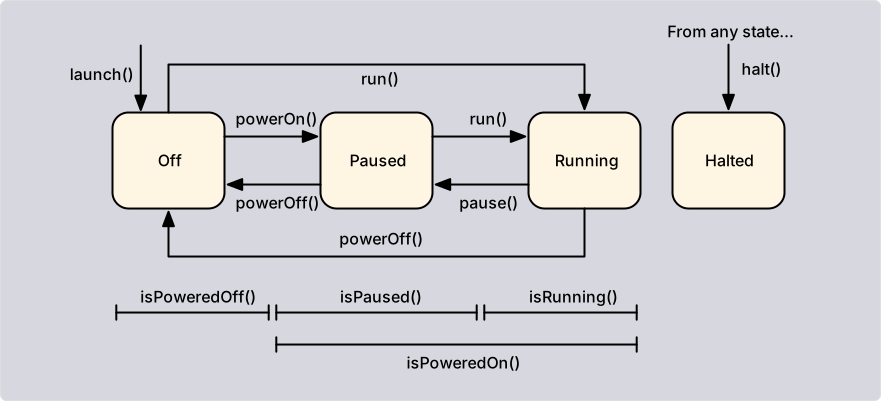
The functions isPoweredOff(), isPaused(), isRunning(), and isPoweredOn() query the state. Running an emulator that is powered off switches it on first. If a required ROM is missing, run() throws a CoreError. checkReady() performs the same check without running the emulator.
Suspension
Independent of the execution state, the emulator thread can be suspended for a short period of time with suspend(). A suspended thread stops at a safe point (it is neither computing a frame nor carrying out commands) and continues once resume() has been called. The execution state does not change. isSuspended() reports whether a suspension is active.
cpp
c64.suspend();

// Read the state of the components consistently

c64.resume();
Suspensions can be nested. Each suspend() must be followed by exactly one resume(), so the code in between must not be left by an exception. Only one thread can hold a suspension at a time; others wait until it is released. The holder must not call a blocking API function, because the emulator thread cannot carry out the request. Such a call throws a CoreError instead of deadlocking. Use the asynchronous flavors instead.
Synchronization
The emulator thread does not run freely. To compute the proper number of frames per second, it waits for an external wake-up signal and then computes all frames that are missing. The front-end sends the signal by calling wakeUp(). The best moment is right after the current texture has been handed over to the GPU, which usually coincides with a VSYNC pulse. If the thread falls too far behind, it resynchronizes itself instead of trying to catch up.
Warp mode
To speed up emulation (e.g., during disk accesses), the emulator can be put into warp mode. In this mode, timing synchronization is disabled and the emulator runs as fast as possible. Several clients can request warp mode independently by using different sources (see warpOn()). The mode stays on as long as at least one source has requested it. The option C64_WARP_MODE selects when warp mode is entered automatically.
Track mode
Similar to warp mode, the emulator can be put into track mode (see trackOn()). A GUI enables it while its debugger is open. In track mode, several time-consuming tasks are performed that are usually left out. For example, the CPU records all executed instructions in a trace buffer.